After you log in you land on Projects, your team’s dashboard. On your first visit the Welcome tour starts there and walks you through a sample project called Demo. Demo appears only while the tour is running. Once you finish or skip the tour, it leaves your dashboard.
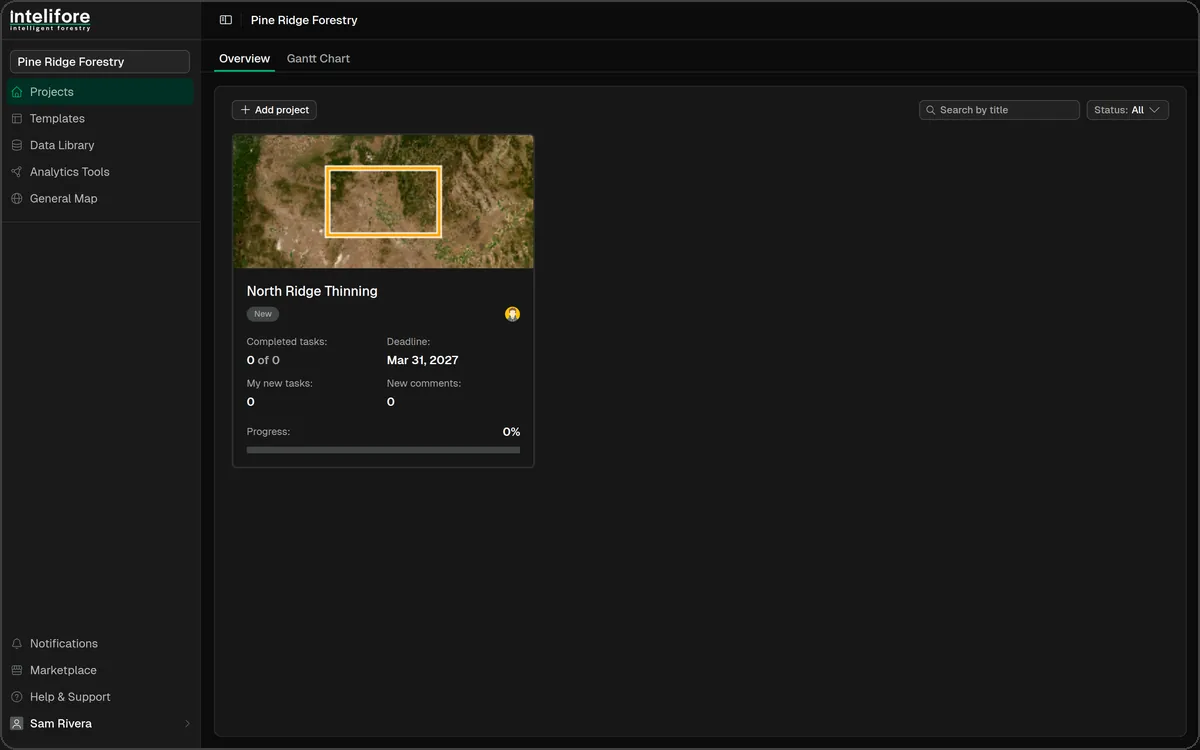
The Projects dashboard
The dashboard lists every project you are a member of, with progress, status, deadlines and team members. Switch between Overview and Gantt Chart, search by title, and filter by status: New, In Progress, In Review, Finished or Archived.
The sidebar
Everything else sits in the left sidebar. Click your name at the bottom to open the menu with Settings, Trash and Sign Out.

Team name (top): the team you’re working in. If you belong to several teams, click it to switch.
Projects: the dashboard described above.
Templates: reusable project templates, with their sections and tasks.
Data Library: your team’s maps, spatial data and files, ready to add to any project.
Analytics Tools: your team’s scripts and pipelines for running analysis.
General Map: all your projects on one map.
Notifications: activity on your projects, with an unread count.
Marketplace: ready-made scripts, pipelines, data and project templates.
Help & Support: opens the help center.
Your name (bottom): Settings, Trash for deleted projects, and Sign Out.
External collaborators see a shorter sidebar: Projects, Notifications, Marketplace and Help & Support.
Guided tours
Under Settings → Onboardings there are seven guided tours. Click Start, or Restart on one you’ve finished.
Welcome: the dashboard, projects and the main areas of the app.
Map: layers and spatial data in the Map Editor.
Task workflow: taking a task from creation to final approval.
Form builder: designing the forms your team fills in on each task.
Analysis: running scripts and pipelines on project data.
Script create and Pipeline create: writing custom scripts and chaining them into pipelines.
Each tour has a Skip onboarding button. Still stuck? Click Help & Support at the bottom of the sidebar.